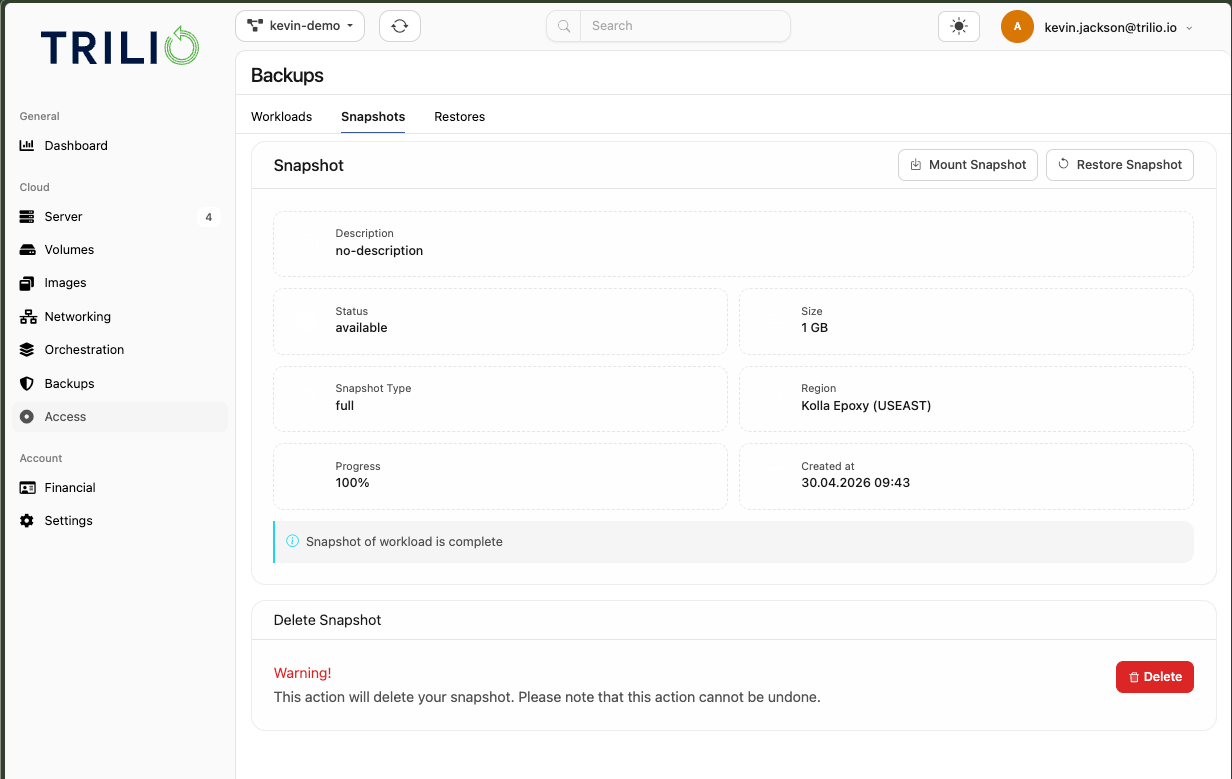
Many users will just create backups with defaults. This creates backups (known and listed currently as Snapshots in Trilio) with the name “Snapshot”.
When a user selects a snapshot to restore, the UI prioritises a lot of information that is largely irrelevant to the immediate action of perform the restore.
User follows this journey:
1. Select Workload
Select the snapshot from that workload
UI changes to the Snapshot tab and prioritises a lot of information over the main possible action: restore. Even Delete is a tempting large option to do here.
It should list the VMs this Snapshot is related to and will restore (along with the Workload name)
Suggest making Restore and Mount clearer, prioritised actions.
Delete should be a smaller detail.
The information about the backup could be much smaller in UI real estate.
The example below shows a default backup taken, I clicked on one of the Workloads, clicked on the Snapshot, and now I’m left wondering if I’ve selected the correct one. Without listing the VMs and the Workload it came from, it isn’t clear the action I should take.